Getting Started
How to get started playing on your computer and online
303 topics in this forum
-
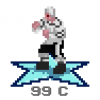
whats the website were you can make the lil jersey icons? some of you guys have them in your signatures... i lost the link thanks
-
- 9 replies
- 3.7k views
-
-
OK, heres my problem: for few days now including today guys ask me to play classic or exhibs on hamachi but for some reason i cant connect to anyone who wants to play on hamachi cause the connection window just says connecting to.... As for hosting it works but only for a short time then it does a data timeout Also i have kept the default port I have no idea why its doing this now when before i had no troubles whatsoever, also configured my firewall settings to make hamachi and gens as exceptions so the connection goes through but it still doesnt work ANy ideas?
-
- 11 replies
- 3.7k views
-
-
Hey All, I'm sat on the waiting list, hoping to get a league place next week or as soon as possible. Until then i'm kicking my heels and dying to get some regular practice games each evening and at the weekend. If you're on the waiting list yourself, or you think you should be around give me a shout. I'm usually online here & my AIM is: gretzkyonacold See if you can handle the Great One! lol..............that's Gretzky, not me!
-
- 1 reply
- 1.6k views
-
-
Here's basically how this networking thing works. (Or you can skip straight ahead to "Step 0" if you want.) (If you don't have a router, then you don't even need to do much: just do "Step 0" and "Step 1") A Typical Network Setup (Note: in the past few years, it's become common for ISPs to provide a single device that works as the modem and the router...) You have a cable or DSL modem or something. It connects to the internet. It has its own IP address. To the rest of the internet, all the computers on your network appear to be coming from that one IP address. If you're curious, you can find out your modem's IP address by going to http://www.ip-adress.com/. Att…
-
- 6 replies
- 8.1k views
-
-
Im having trouble seeing other peoples hamachi ip addresses, as well as being able to host even if I give them mine. I have been able to get 2 games in by joining, is there anything I may have running that is preventing hosting from happening? Note: I do get a message when I host that says- warning: hosting requires hosting ports to be forwarded and enabled in firewalls any suggestions?
-
- 0 replies
- 1.8k views
-
-
Hi, i'm a newby to all this, and only computer literate on a basic level. I installed Hamachi a couple of days ago obviously for the purpose of joining the league, and had a number of successful test games without incident. Then last night during set up of a game I lost my internet connection completely and found I only had a local area connection to "network 4" (Hamachi) diagnostics suggested there were problems with the IP settings for the Hamachi network, but not being too computer savvy I presumed it was just a problem with my internet and cable service. After about an hour without internet & trying various diagnostic suggestions I turned off for the evening. I…
-
- 5 replies
- 2.9k views
-
-
Hi all, As a new member i'm on the waiting list for GENS B. Before joining this site i've never been one for manual goaltending, so really want to have some regular matches to get used to it. If you're also on the waiting list for one of the leagues maybe you could put your information here and when you're available to play and we can schedule some games. Much appreciated, and look forward to playing!
-
- 2 replies
- 2.1k views
-
-
Hi All, I remember playing nhl 94-98 on my genisis back in the day. WE would play these games after work and make all sorts of trades etc. Now I have grown up lol and have a psp. I am looking for some historical stats on players. Would love to create a team that has a 87 gretzky, '92 lemeuix, maybe a late 80's wendel clark and bob probert etc I did find a spreadsheet that had the 2002 ratings. you know, shot power, aggressiveness etc. Is there anyone on this forum that has this? Thanks in advance Go Habs Go!
-
- 2 replies
- 2.1k views
-
-
Hey I'm new here and got 1 question - what are the PC controls for game 94 snes? I found out that C is pass and D is shot, what else? thanks guys
-
- 2 replies
- 1.9k views
-
-
Whats up... this forum is awesome! Quick Noob question... my kid has a Nintendo DSi, will the SNES NHL94 rom work on this? If so, how do I set it up? I am pretty technical (java developer), but I have little experience messing with game consoles. The DS would be ideal b/c it mimics the old SNES paddle and I wouldn't have to go buy one and use it on my laptop etc Thanks in advance
-
- 1 reply
- 1.6k views
-
-
-
Do the roms of nhlpa 93 and nhl 94 not save your playoffs? I have played numerous different ones (both originals and hacks) downloaded from this site and others and all have some issue with saving the playoffs. I am playing on a Mac and using the emulator called Generator. Thanks for any help.
-
- 4 replies
- 2.7k views
-
-
could some1 give me the info on how to play 2 on 2 hockey,like back in the day when u could use the 4 player hookup
-
- 2 replies
- 2.1k views
-
-
are we able to use user records online if were playing our friends
-
- 1 reply
- 1.7k views
-
-
i know im posting alot but i have alot of questions,is this game only for 2 players or can we play like 2 on 2 like back in the day with the 4 player hookup
-
- 1 reply
- 1.6k views
-
-
Im new to this website and im learning how everything is run but i already see everyone having to post to set up a game,ha(s anyone ever tried teamspeak 3,if we had this option we could just get on the computer(would have to have a headset with a mic)and actually talk to set games up,i think for a teamspeak site its like $6 a month,we could put up a donation to help pay for it,just a suggestion from a newbie
-
- 1 reply
- 1.6k views
-
-
My AIM username is kerrymmurray, please hit me up to play a few friendly's. I am usually on after 9pm EST during the week. Thanks.
-
- 16 replies
- 5.7k views
-
-
Hey guys,me and my buddies are in the process of getting everything setup,weve played some games online so far but there seems to be some choppiness to the games,we both have 32 bit vista,good computers with memory and graphics,we have great internet connections,the gameplay for the most part is great but it will get choppy here and there,any suggestions,we have basic knowledge of what were doing but we are not computer guys,also ive read some posts about the things we should hack on the game and i get the basic concept but dont know how to actually do it,are any of u on some kind of teamspeak where someone could help us out,we want to eventually be on your leagues but we…
-
- 1 reply
- 1.8k views
-
-
Ok so I downloaded the files on my pc and it worked with no problems, but now ive downloaded the same file onto my laptop and when I run the emulator all I get is a black screen? any ideas? I am using a pentium 3 1.13ghz 512mb ram ibm thinkpad laptop original graphics card and all that. Thanks Just an update that I installed the gens emulator witout changing any of my laptop settings and the gens emulator works fine.
-
- 4 replies
- 2.2k views
-
-
I found the explantion kinda confusing for how I can start playing NHL94. What should I play Gen or SNES? Where do I find the downloads? What else do I need to download? What would be a good, fairly cheap controller I can buy to play? What all do I need to download? I'm not a very computer savy person, links would be nice Cheers and thanks for any assistance, Matt Super Mario
-
- 6 replies
- 2.8k views
-
-
Hi, is it possible to play online via DOS version of NHL 94? I've played this version for several years and I just can't settle to SNES version..... (sorry if it's solved - "dos" is too short to type in this forum's search) Best regards from Czech Republic!
-
- 0 replies
- 1.1k views
-
-
-
I have download the NHL 94 iso from the downloads page plus the music tracks. All the README says is to combine them using a hex editor. Can anyone direct me how to do that?
-
- 0 replies
- 1.1k views
-
-
Its been a long time since ive been here and I want to ask how I can download the GENS NHL 94 properly thanks
-
- 2 replies
- 1.6k views
-
-
I picked up an NHL94 SNES cartridge a couple weeks ago, and I've been playing almost every day. I've never been this terrible at a video game before... I'm embarrassingly bad. I played both sides of a 100+ round shootout without scoring. I get shut out in at least half of my games, including one I just finished where I went 0 for 33 on one-timers. I feel like I'm skating well, I'm playing solid D (most of my games go into overtime at 0-0), and I understand the mechanics of putting shots on goal, but hardly anything is falling for me. I read the manual cover to cover, I read this page and watched all the videos, but clearly I've got some fundamental misunderstanding, becau…
-
- 20 replies
- 9.9k views
-