

Leaderboard
-
bcrt2000
Members3Points142Posts -
chaos
Admin1Points2,191Posts -
LaTormenta
Members1Points145Posts


Popular Content
Showing content with the highest reputation on 11/21/2025 in all areas
-
Read the linked post, it will tell you how to find the tiles. Frame 405 and 406 are the nets.1 point
-
Here's another thing I've taken a look at-- the differences of animations between 92-94 Genesis and 94-95 PC: # Sprite Investigation: ## NHL 92: Sprites.anim: Frame 0-548 0-376: player sprites 377-382: arrows 383-385: star 386-396: puck 397-398: net 399-510: goalie sprites 511-534: team centre ice 535-548: goal light ## NHLPA 93: 0-369: identical player sprites as 92 370-375: new fight loss injury sprites 376-382: same as 92 370-376 383-388: arrows 389-391: star 392: new instant replay cross hair 393-403: puck 404-405: net 406-553: goalie sprites (518-553 new save/stick tap anims for 93) 554-567: goal light 568-643: new player animations for 93 (swat puck, hooking, wobble, flip, injury) 644-648: broken glass ## NHL 94 Genesis: 0-351: identical player sprites as 93 352-375: empty fighting sprites 376-382: identical player sprites as 93 383-388: arrows (identical to 93) 389-391: star (identical to 93) 392: instant replay cross hair (identical to 93) 393-403: puck (identical to 93) 404-405: net (identical to 93) 406-537: goalie sprites (identical to 93) 538-561: new goalie twitch animation (goalie animation from 93 in this spot may have been cut?) 562-575: goal light (identical to 93) 576-651: player sprites (swat puck, hooking, wobble, flip, injury) -- same as 568-643 for 93, but without blood on injury 652-656: broken glass (identical to 93) 657-712: new goalie animations (shoulder save, stick save, pokecheck) 713-836: new player animations (one-timer, check into boards) 837-844: player 3/4 arrows/star ## NHL 94 DOS: Sprites 000-875 Crowd Sprites F000-F149 0-351: identical player sprites as 93/94 352-355: arrows 356: mouse control crosshair 357-358: player accepting stanley cup 359-368: faceoff sprites (new for PC) 369-371: national anthem sprites (new for PC) 372-379: goalie/player line change (are these new?) 380-381: national anthem sprites (new for PC) 382: player on bench/penalty box 383-388: arrows (identical to 93/94) 389-391: star (identical to 93/94) 392: instant replay cross hair (identical to 93/94) 393-403: puck (identical to 93/94) 405-406: net (identical to 93/94) 407-553: goalie sprites (identical to 93) 554-567: goal light (same index as 93 but sprites look modified) 568-643: player animations (swat puck, hooking, wobble, flip, injury) -- identical to 93 644-648: broken glass (same index as 93 but sprites look modified) 649-698: referee animations (new for PC) 699-702: between play at bench animations (new for PC) 703-871: referee animations, mouse control UI (new for PC) 872-875: stanley cup skating sprites (new for PC) ## NHL 95 DOS: Sprites 000-875 are identical to 94 (not 100% verified) 876-886: player checked into bench (new for 95 PC) 887: player celebration 888-903: upright crosscheck (new for 95 PC) 904-973: checked into boards (new for 95 PC-- 94 Genesis has similar sprites but seems like these were created from scratch) 974-1071: goalie animations (new for 95 PC-- are these from SNES version?) 1072-1127: shot blocking (new for 95 PC) 1128-1133: referee animations (new for 95 PC)1 point
-
Hey folks, you may have seen that there has been some activity on my end-- released a tool to extract 92/93/94 sprites, which is in the Tools section of this forum. I was just noodling around and found the list of animation names in the PC version of NHL95. Would be useful for anyone reverse engineering 93/94 and needing to create names for the new animations added since NHL92 gready gready2 gglover gglovel gglovel2 gstickr gstickl gstackr gstackl gdive gswing gskate pflip glide skatewp skate turnl turnr stop passf passb shotf shotb glideback skateback sweepchk shoulderchkl shoulderchkr hipchkl hipchkr burst hold hold2 flail fallfwd fallback celebrate pump wallright wallleft faceoff faceoffr siren bglass stanley catch hook hook2 stumble fake flip injury1 refglide refskate refturnl refturnr refstop reffallback armupglide armupskate armupturnl armupturnr armupstop refpickup refpointgoa refdrop reffowait refrough refcharge refslash refxcheck refhook reftrip refinterfer refhold refabuseoff refbehind faceoffpoke gwallright gwallleft anthem1 anthem2 anthem3 anthem4 anthem5 drink refanthem1 refanthem2 onetimef onetimeb getcup brcup gvcup clap stansk crosscheck boardback boardfront boardright boardleft benchcheckr benchcheckl refpenshot goaliepoke goalieknee gokneehold gofallback gofallglove gofallstick fakeshotf fakeshotb fakeonetimef fakeonetimeb blockleft blockright blockfront blockknee refelbow refhistick and then there seems to be a list of AI routines (from Logic1.asm): defo defd wingd wingo centd cento score stan exben expen bench pen dopen goalie goalieget puckc nearest shoot passrec 3star r3star fowait pnorm pshad pnothing pface pface2 gamemiscon rfaceoff rnorm rcallpen rpickup rgotofo rpointgoal rgetnew anth ranth agotofo benwait initper pgivecup rpenshot apswait abreak Thank you to chaos for identifying the AI routines1 point
-
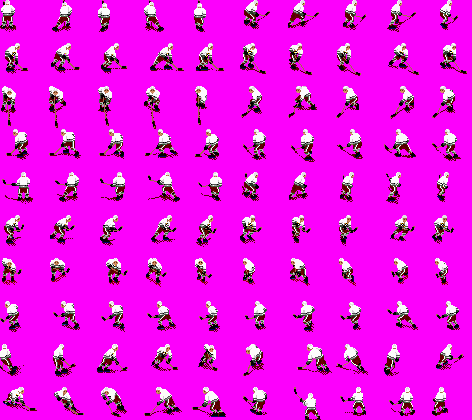
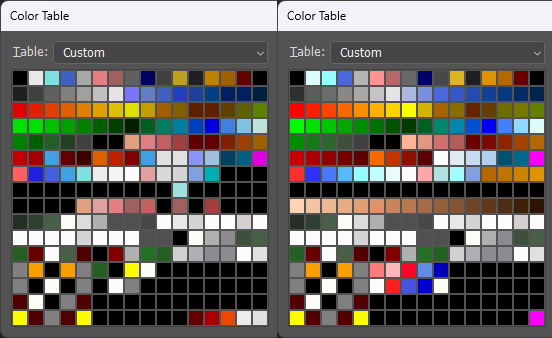
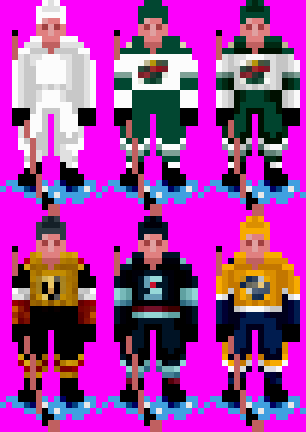
OK will try to add all the progress I've made since last post. Finished the QFS-To-BMP converter (available on my Github). It will extract almost all the image assets from the game with correct palettes automatically applied. Just need to look into one issue with the CTLogos. Started on an NHL95 Team Swap mod. Super WIP at this point. This won't expand the game to 32 teams in the traditional way like the Genesis ROM hacks have, but it will give you the ability to start the game with 26 of the 32 NHL Teams plus 2 of the 4. Just for simplicity sake the way it will probably work is that the UI will allow you to select 6 or 7 out of the 8 teams in each division to be able to play the game with. Will let you play a playoffs with the 16 teams you want to or a season with the 26 teams you want to. So far I'm quickly prototyping jersey designs in photoshop, created a shader of sorts in Photoshop based on how EA shaded sprites originally in NHL 95 so that I can just work with flat colours and apply the shading on top. Here's an example of how it works with Minnesota plus some prototype designs for other teams: I have also created a document which explains what parts of the .EXE have to be modified to expand the game from 26 to 32 teams. Not a priority for me but a starting point for anyone else. Created a document which explains how Centre Ices work and how to modify them. Documents the .TIL, .MAP and even some locations in the .EXE where this is all configured and how it all works. This may eventually turn into a Centre Ice exporter/importer (especially as I continue on the Team Swap mod, I'd probably want to have a tool). One thing I figured out after running the completed QFS-To-BMP tools is that the palettes used to create the team palettes in HOMEPALS/AWAYPALS.bin are actually stored in the HOMEPAL3/AWAYPAL3.QFS files. Here's how some of the sprites look like with it applied: Here's a comparison between the palette which was extracted via my PAL-To-ACT tools (left) versus the palettes from the QFS (right) Also added two more videos to my NHL 95 hacking series on youtube which go over how palettes work in the game, and what my workflow looks like when working with paletted sprites. And the second video goes over the Centre Ice format The next thing for me to work on is figuring out how to pull NHL 23 ratings + official '22-23 stats and put them in a format that I can both use for my engine remake, and the team swap mod.
 1 point
-
1 pointI have updated my Hakchi / Retroarch build today and decided to cobble together a generic cover for the original 2-on-2 ROM. If anyone is interested in this sort of thing, here you go - original size (the first one) and a resized one (the second one) for a Genesis Mini Retroarch build:

 1 point

