Skip to content
View in the app

A better way to browse. Learn more.

NHL'94 Forums

A full-screen app on your home screen with push notifications, badges and more.

To install this app on iOS and iPadOS
  1. Tap the Share icon in Safari
  2. Scroll the menu and tap Add to Home Screen.
  3. Tap Add in the top-right corner.
To install this app on Android
  1. Tap the 3-dot menu (⋮) in the top-right corner of the browser.
  2. Tap Add to Home screen or Install app.
  3. Confirm by tapping Install.
  • Search By Tags

    Search will match any tag entered
  • Search By Author

Content Type

Forums

  • Welcome & Getting Started
    • Welcome Rookies
    • Global Announcements
    • NHL'94 Community
  • About NHL'94
    • General NHL'94 Discussion
    • Game & Strategy Discussion
    • Team & Player Attributes
    • NHL'94 Media / Press
    • NHL Discussion
    • NHL 94 Rewind
    • Game Mechanics
  • Playing on Emulator & Online
    • Getting Started
    • Retroarch
    • Sega Genesis Emulators
    • Super Nintendo Emulators
    • Online Leagues
    • Hardware
  • Live NHL'94 Tournaments
    • King of '94
    • Long Island Retro Expo - NHL'94 Tournament
    • Edge of '94 - Midwest
    • NYC Tournament
    • Tournaments organized by Halifax
    • Other NHL'94 Live Tournaments
  • Editing & Hacking
    • General Questions & Discussion
    • Sega Genesis / Mega Drive Hacking
    • Super Nintendo Hacking
    • ROMs
  • Other NHL Titles
    • Mutant League Hockey
    • EA Hockey ('91)
    • NHL Hockey ('92)
    • NHLPA '93
    • NHL '95
    • NHL '96
    • NHL '97
    • NHL '98
    • Post '98 Titles & Other Hockey Titles

Calendars

  • Community Calendar

Find results in

Find results that contain...

Date Created

  • Start

    End

Last Updated

  • Start

    End


Filter by number of...

  • Minimum number of comments

  • Minimum number of replies

  • Minimum number of reviews

  • Minimum number of views

Found 1 result

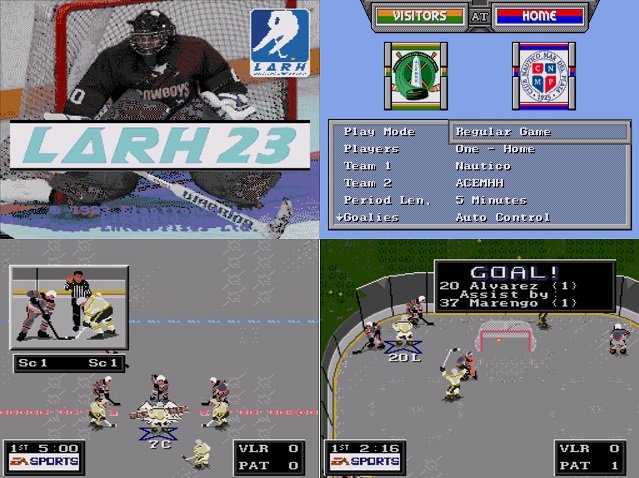
  1. Hi all! I am new to the community, I have been registered for a couple of months although I have known this website for several years! I admire the work they do and the passion they have for this game. I discovered this game in 2005 when I had my SNES. In fact, with that cartridge I learned the rules of the game and became a fan of this sport (I love Flyers). Unfortunately here in Buenos Aires, Argentina, ice hockey is not popular, so much so that the only rink that exists in the country is in the southernmost city we have, Usuahía. But a couple of years ago I discovered by chance that Roller Hockey (Inline Hockey) is played in my city, so I decided to do a edited game with this league! I taken as base the game Ball Hockey from user TheTome. (love the grey rink he maked) and i edit all the teams, logos, rosters, uniforms and split screens. (the choice of the 3 stars of the match is imprecise, despite the fact that it is patched and I can't edit the title screen credits. If anyone knows how to modify them with TM, tell me, thanks!) LARH (Liga Argentina de Roller Hockey in spanish or Argentinian Roller Hockey League in English) It is a league divided into sub-divisions and into male and female categories. Made up of clubs and small "franchises". Obviously taking advantage of the great slot of teams that the game admits, I gathered a lot of teams in a single space. A curious detail, although there is a women's league, many men's teams are mixed, have female players and even in the men's league there is a team made up only of women (Metropolis). Maybe this will happen in other leagues, I don't know, but it caught my attention. Features: - 29 Teams of Men League (Elite, A, B and C leagues) - 1 Team of Women League (Punchers, last champion of the league) - The orange ball is replaced by an orange puck - 4 on 4 teams Download: LARH 23.bin Images:
Account

Navigation

Search

Search

Configure browser push notifications

Chrome (Android)
  1. Tap the lock icon next to the address bar.
  2. Tap Permissions → Notifications.
  3. Adjust your preference.
Chrome (Desktop)
  1. Click the padlock icon in the address bar.
  2. Select Site settings.
  3. Find Notifications and adjust your preference.