Skip to content
View in the app

A better way to browse. Learn more.

NHL'94 Forums

A full-screen app on your home screen with push notifications, badges and more.

To install this app on iOS and iPadOS
  1. Tap the Share icon in Safari
  2. Scroll the menu and tap Add to Home Screen.
  3. Tap Add in the top-right corner.
To install this app on Android
  1. Tap the 3-dot menu (⋮) in the top-right corner of the browser.
  2. Tap Add to Home screen or Install app.
  3. Confirm by tapping Install.

bcrt2000

Members
  • Joined

  • Last visited

  1. I contacted him 3 years ago, and he claims he’s not the same Toni Wilen. Definitely a wild coincidence if there are 2 super smart developers with the same name working on reverse engineering software/hardware from the same era. But, either he doesn’t want to deal with it, or he’s telling the truth and the other Toni Wilen vanished.
  2. bcrt2000 replied to VSM1974's topic in Getting Started
    You need to add some details. What game are you trying to play? Include platform as well. If its a DOS version of NHL, what version of DOSBox are you using?
  3. I want to detail the rest of what I know about the sprite format before I put a pause on this for now. At some point I will write a sprite extractor, but I want to focus on 93/94 disassembly to get something compilable out ASAP. Here is the file format for the Frame Data/Sprite Header for NHL 94 SNES that is known so far: I think the one thing that can be confusing is how the tiles are picked-- First is Size-- FF seems to indicate a 2x2 tiled Sprite, and 00 seems to indicate a 1x1 tiled Sprite If its a 1x1 tiled sprite, its simple, the First Tile gets selected. If its a 2x2 tiled sprite though, it selects First Tile, First Tile + 1, (First Tile +1) + Stride, (First Tile + 1) + Stride + 1 So for Frame 1: Frame X Data (Sprite Header): [Number of Sprites] 80 [Number of Tiles] 00 E2 FF 07 00 E2 FF [Stride] 00 A0 00 80 00 [Length of Frame Data] 00 02 E4 [Hostpot 2 X] [Hotspot 2 Y] Frame 1 Data (Sprite Header): 03 80 09 00 FA FF 07 00 E2 FF 04 00 A0 00 80 00 2B 00 02 E4 00 00 Frame X Sprite X: [X offset] [Y offset] [First Tile] [Palette?] [Size] Frame 1 Sprite 1: FA FF E2 FF 00 08 FF <- -6, -30 Frame 1 Sprite 2: FA F2 FF FF 02 08 FF <- -6, -14 Frame 1 Sprite 3: FE FF 02 00 04 08 00 <- -2, 2 Frame 1 has a Stride of 4. Sprite 1: Tile 0, 1, 5, 6 Sprite 2: Tile 2, 3, 7, 8 Sprite 3: Tile 4 Frame 2: Frame X Data (Sprite Header): [Number of Sprites] 80 [Number of Tiles] 00 E2 FF 07 00 E2 FF [Stride] 00 A0 00 80 00 [Length of Frame Data] 00 02 E4 [Hostpot 2 X] [Hotspot 2 Y] Frame 2 Data (Sprite Header): 05 80 0B 00 F7 FF 09 00 E3 FF 05 00 C0 00 A0 00 39 00 01 E5 00 00 Frame X Sprite X: [X offset] [Y offset] [First Tile] [Palette?] [Size] Frame 2 Sprite 1: FD FF E3 FF 00 08 FF <- -3, -29 Frame 2 Sprite 2: F7 FF F3 FF 02 08 FF <- -9, -13 Frame 2 Sprite 3: 07 00 FB FF 04 08 00 <- 7, -5 Frame 2 Sprite 4: F8 FF 03 00 05 08 00 <- -8, 3 Frame 2 Sprite 5: 00 00 03 00 14 08 00 <- 0, 3 Frame 2 has a Stride of 5. Sprite 1: Tile 0,1,6,7 Sprite 2: Tile 2,3,8,9 Sprite 3: Tile 4 Sprite 4: Tile 5 Sprite 5: This is where it gets weird and I don't fully understand-- the value is 20 which is double the value of 10. Could it have something to do with flipping the tile perhaps? I haven't investigated enough. I have to look at more frames to figure this out, and also closely compare how the frame is rendered in the game to how I would compose the frame. Frame X Sprite X: [X offset] [Y offset] [First Tile] [Palette?] [Size] Frame 2 Sprite 1: FD FF E3 FF 00 08 FF <- -3, -29 Frame 2 Sprite 2: F7 FF F3 FF 02 08 FF <- -9, -13 Frame 2 Sprite 3: 07 00 FB FF 04 08 00 <- 7, -5 Frame 2 Sprite 4: F8 FF 03 00 05 08 00 <- -8, 3 Frame 2 Sprite 5: 00 00 03 00 14 08 00 <- 0, 3 So 95%+ of the NHL94 frames format is known at this point IMO. There may be some weird things that pop up that should be easy to figure out given by the limited number of bytes used per sprite.
  4. A couple of things-- apparently that wasn't the full GetHot function. It was originally detected as data but when analyzing it it seems like it reads bytes 0x12-0x15. 0x14-15 is another X,Y pair-- potentially a secondary hotspot or some sort of bounding box. It doesn't matter in frame1/2 case as its zero'd out on both. Secondly, I think I was rash to dismiss the idea that SNES didn't use a sprite system like Genesis. I think that explains why the frame data is different lengths. Frame 2 uses more sprites than Frame 1. I think I might have figured out how the data is laid out-- I think the first byte in the Frame Data indicates how many sprites are used, and then after that its 7 bytes per Sprite. Frame 1 Data (Sprite Header): 03 80 09 00 FA FF 07 00 E2 FF 04 00 A0 00 80 00 2B 00 02 E4 00 00 Frame 1 Sprite 1: FA FF E2 FF 00 08 FF Frame 1 Sprite 2: FA FF F2 FF 02 08 FF Frame 1 Sprite 3: FE FF 02 00 04 08 00 Frame 2 Data (Sprite Header): 05 80 0B 00 F7 FF 09 00 E3 FF 05 00 C0 00 A0 00 39 00 01 E5 00 00 Frame 2 Sprite 1: FD FF E3 FF 00 08 FF Frame 2 Sprite 2: F7 FF F3 FF 02 08 FF Frame 2 Sprite 3: 07 00 FB FF 04 08 00 Frame 2 Sprite 4: F8 FF 03 00 05 08 00 Frame 2 Sprite 5: 00 00 03 00 14 08 00 I'll have to look at more frames to see if this pattern holds up. I think byte 1-2 are the X coordinate of the sprite, and byte 3-4 are the Y coordinate of the sprite. And then the remaining bytes must have to do with tile selection, and potentially flip bytes and/or palette selection Frame 1 Data (Sprite Header): 03 80 09 00 FA FF 07 00 E2 FF 04 00 A0 00 80 00 2B 00 02 E4 00 00 Frame 1 Sprite 1: FA FF E2 FF 00 08 FF <- -6, -30 Frame 1 Sprite 2: FA FF F2 FF 02 08 FF <- -6, -14 Frame 1 Sprite 3: FE FF 02 00 04 08 00 <- -2, 2 Frame 2 Data (Sprite Header): 05 80 0B 00 F7 FF 09 00 E3 FF 05 00 C0 00 A0 00 39 00 01 E5 00 00 Frame 2 Sprite 1: FD FF E3 FF 00 08 FF <- -3, -29 Frame 2 Sprite 2: F7 FF F3 FF 02 08 FF <- -9, -13 Frame 2 Sprite 3: 07 00 FB FF 04 08 00 <- 7, -5 Frame 2 Sprite 4: F8 FF 03 00 05 08 00 <- -8, 3 Frame 2 Sprite 5: 00 00 03 00 14 08 00 <- 0, 3
  5. I found I believe the equivalent of GetHot-- this is one place in the code that I've found accesses the Frame Data Header. I ran this through Grok and this is what it tells me it does: .9B:C002 read_frame_header_and_adjust_hotspot: ; CODE XREF: sub_9E8C35+43↓P .9B:C002 ; sub_9EEB2E+66↓P .9B:C002 ; Reads frame data pointer from table, extracts signed byte hotspot/offset values at +$12/+$13, .9B:C002 ; applies flip negations based on orientation flags, and optional 90-degree rotation transform. .9B:C002 ; Input: A = index (transferred to Y for RAM lookup) .9B:C002 ; Output: Adjusted X/Y hotspots in word_7E00A5 (X) and word_7E00A9 (Y) .9B:C002 ; Uses: X (preserved), Y (temp), word_7E000C/000E (temp long pointer) .9B:C002 .9B:C002 PHX ; Preserve original X .9B:C003 TAY ; Y = input index .9B:C004 LDA word_7E0D97,Y ; Load frame number or state from RAM table .9B:C007 DEC ; frame_index - 1 .9B:C008 ASL ; \ .9B:C009 ASL ; / *4 for table offset (assuming 4-byte entries) .9B:C00A TAX ; X = table index .9B:C00B LDA frame_data_header,X ; Load low 16-bit offset to frame data .9B:C00F CLC .9B:C010 ADC #$8000 ; Add base address low .9B:C013 STA D,word_7E000C ; Store to temp pointer low .9B:C015 LDA word_828002,X ; Load high/bank offset .9B:C019 ADC #$82 ; Add base bank .9B:C01C STA D,word_7E000E ; Store to temp pointer bank (forms 24-bit pointer) .9B:C01E TYX ; Y = original X (unused here?) .9B:C01F LDY #$12 ; Y = $12 (offset 18 decimal into frame data) .9B:C022 LDA [D,word_7E000C],Y ; Load byte at frame_data + $12 (likely X hotspot/offset) .9B:C024 AND #$FF ; Mask to byte .9B:C027 CMP #$80 ; Check if signed negative (>= $80) .9B:C02A BCC sign_extend_x_done ; If < $80, positive - skip sign extend .9B:C02C ORA #$FF00 ; Else, sign extend to negative word .9B:C02F .9B:C02F sign_extend_x_done: ; CODE XREF: read_frame_header_and_adjust_hotspot+28↑j .9B:C02F STA D,word_7E00A5 ; Store adjusted X hotspot/offset .9B:C031 INY ; Y = $13 (offset 19 decimal) .9B:C032 LDA [D,word_7E000C],Y ; Load byte at frame_data + $13 (likely Y hotspot/offset) .9B:C034 AND #$FF ; Mask to byte .9B:C037 CMP #$80 ; Check if signed negative .9B:C03A BCC sign_extend_y_done ; If < $80, positive - skip .9B:C03C ORA #$FF00 ; Else, sign extend .9B:C03F .9B:C03F sign_extend_y_done: ; CODE XREF: read_frame_header_and_adjust_hotspot+38↑j .9B:C03F STA D,word_7E00A9 ; Store adjusted Y hotspot/offset .9B:C041 LDA word_7E0E03,X ; Load orientation flags for this frame .9B:C044 BIT #$800 ; Test bit 11 (horizontal flip/mirror flag?) .9B:C047 BEQ no_hflip ; If clear, skip negate .9B:C049 LDA #0 .9B:C04C SEC .9B:C04D SBC D,word_7E00A5 ; Negate X .9B:C04F STA D,word_7E00A5 .9B:C051 .9B:C051 no_hflip: ; CODE XREF: read_frame_header_and_adjust_hotspot+45↑j .9B:C051 LDA word_7E0E03,X ; Reload flags (redundant, but original) .9B:C054 BIT #$1000 ; Test bit 12 (vertical flip/mirror flag?) .9B:C057 BNE no_vflip ; If set, skip negate (inverted logic: clear = apply flip) .9B:C059 LDA #0 .9B:C05C SEC .9B:C05D SBC D,word_7E00A9 ; Negate Y .9B:C05F STA D,word_7E00A9 .9B:C061 .9B:C061 no_vflip: ; CODE XREF: read_frame_header_and_adjust_hotspot+55↑j .9B:C061 LDA word_7E15DA ; Load potential rotation/mode flag .9B:C064 BEQ no_rotation ; If zero, skip transform .9B:C066 LDA D,word_7E00A5 ; Load current X .9B:C068 LDY D,word_7E00A9 ; Load current Y to Y reg .9B:C06A EOR #$FFFF .9B:C06D INC ; Negate X (+1 for two's complement) .9B:C06E STA D,word_7E00A9 ; Store -old_X as new Y .9B:C070 STY D,word_7E00A5 ; Store old_Y as new X (90° clockwise rotation) .9B:C072 .9B:C072 no_rotation: ; CODE XREF: read_frame_header_and_adjust_hotspot+62↑j .9B:C072 PLX ; Restore original X .9B:C073 RTL ; Return long .9B:C073 ; End of function read_frame_header_and_adjust_hotspot The function (read_frame_data_header, which prepares frame hotspot/offset values) only reads two specific bytes from the provided frame data: the signed byte at offset $12 (decimal 18, likely a horizontal/X hotspot or attachment offset) and the signed byte at offset $13 (decimal 19, likely a vertical/Y hotspot or attachment offset). These are sign-extended to 16-bit words before further processing (conditional negations for flips and an optional 90° rotation transform, based on external flags not provided here). Frame 1 Byte at offset $12 (18): $02 (sign-extended to $0002 or +2 decimal). Byte at offset $13 (19): $E4 (sign-extended to $FFE4 or -28 decimal). Frame 2 Byte at offset $12 (18): $01 (sign-extended to $0001 or +1 decimal). Byte at offset $13 (19): $E5 (sign-extended to $FFE5 or -27 decimal). --- So at least that's potentially 2 more values from the header that we know.
  6. I have found the location of animations in NHL 94 & 95 for PC NHL94PC Animation data (SPAList) starts at 0x358A6 (Hockey.exe) NHL95PC Animation data (SPAList) starts at 0x110475 (Hockey.exe) The format is identical to NHL92-94 Genesis where it starts with an animation header which has offsets to each direction's animation data, which is then followed by the animation data for each direction. The only differences are: its little endian instead of big endian, so you'll need to byte swap the data for it to be readable the frame data starts at index 0 on PC instead of index 1 on Genesis I would love to build a tool that lets you view all of the animations across 92-97 Genesis, 94-95 PC and 94 SNES (just recently posted another topic on some progress on 94 sprite/frames and animation format).
  7. (Through this remember that SNES is little endian, in many cases you need to byte swap the data to get something readable) 94 SNES has 976 frames. Seems like they put the frame data ahead of each frame's tile data in SNES. Frame data header is 0x10000-0x10F40 (4 bytes per frame, 976 frames) These seem to be 32-bit offsets that are relative from the current code segment, which in this case starts at 0x10000. The first offset is F40, so the first frame's data should be at 0x10F40. Frame data for first frame is 0x10F40-0x10F6B -- which points to tile Data from 0x10F6B-0x1108B Frame 1 uses 9 tiles. 0x120 bytes of tile data. Each tile is 0x20 bytes or 32 bytes of data. All Tile data is approximately 0x10F4C-0x75880 (4bpp planar composite). Here is the Tile data for frame 1 in TM: frame 1 assembled by hand in Photoshop: I don't fully understand how the tiles are being placed on the canvas yet. Here is a look at the Frame Data for a few frames: Frame 1 frame data starts 0x10F40-0x10F6A -- 9 tiles, 2B in length (43) -- assuming tile data = 9*4bytes=36bytes -- 7 bytes extra Frame 1 tile data starts 0x10F6B 03 80 09 00 FA FF 07 00 E2 FF 04 00 A0 00 80 00 2B 00 02 E4 00 00 FA FF E2 FF 00 08 FF FA FF F2 FF 02 08 FF FE FF 02 00 04 08 00 Frame 2 frame data starts 0x1108B-0x110C3 -- 11 tiles, 39 in length (57) - assuming tile data = 11*4bytes=44bytes -- 13 bytes extra Frame 2 tile data starts 0x110C4 05 80 0B 00 F7 FF 09 00 E3 FF 05 00 C0 00 A0 00 39 00 01 E5 00 00 FD FF E3 FF 00 08 FF F7 FF F3 FF 02 08 FF 07 00 FB FF 04 08 00 F8 FF 03 00 05 08 00 00 00 03 00 14 08 00 So a couple of things above threw me off. One-- the frame data is an uneven length. I've since found out that for SNES it doesn't matter as much to align the data to even lengths as it is on Genesis since the CPU can handle unaligned data accesses. And when they can shorten 32-bit data to 16-bit, they do, since the SNES CPU doesn't natively support 32-bit data reads (which can lead to the misalignment). Secondly, there is not outright pattern to why the second frame's data is so much bigger than the first frame-- its only two tiles bigger. It doesn't account for the extra space in the header. Now what I think I do know is that byte 3 = Number of tiles Frame 1 Byte 3 - 0x09 = 9 tiles Frame 2 Byte 3 - 0x0B = 11 tiles I also believe the 17th byte indicates the length of the frame data Frame 1 Byte 17 - 0x2B = 43 bytes Frame 2 Byte 17 - 0x39 = 57 bytes I wanted to see how Frame 2 was assembled: (the above is an approximation-- might be off a pixel on one of the shadow tiles or pants tiles but I believe this mostly right) So this shows me that the tile laying system is sufficiently complex, its similar to how sprites are laid in the frame in the Genesis version-- seems like tiles on SNES can be laid on a per pixel basis. There's a couple of options to figure this out-- one is to find the addframe function in the code. Another is to just mess around with changing values in the frame data for frame 1 and see what happens in the game. I also wanted to find the animation data. The easiest thing to do was to search for SPApflip as it has a bunch of -4096 values which will stand out (below is frame data from NHLPA93 Gen): In NHLPA 93's rom for Genesis (I've been referencing this since this is what I've been recently working with disassembling) you can find the animation data for PFLIP direction 4-7 at 0x52AA-52B9: I asked grok to write me a node script to find `00 F0 ?? ?? 00 F0 ?? 00 F0` and voila, the script found me this at 0xEEA0A-0xEEA19: the puck frames are slightly offset between Genesis and SNES here Genesis references frame 0x18B (395) and 0x18F (399) SNES references frame 0x18D (397) and 0x191 (401) I actually had found the animation frames much easier on 94/95PC because the animation header format was the same between Genesis and PC. Here there is a difference: Genesis animation header is on the left, SNES animation header is on the right. On both, you've got eight 16-bit offsets to direction 0-7's animation data. However, on Genesis its relative from the start of the Animation Header. On SNES I believe its relative from the start of the code segment, which starts at 0xE0000. I traced the data back to the start and end and it looks like the animation data for SNES 94 lives at 0xEE0FC-EFF6E. OK, that's all that's known for now!
  8. Question for you @chaos @chaos_94 i'm trying to figure out the structure of frames.asm for 93. In 92 it goes something like this: 92 frame.asm format: <offset from SPAList> - header or offset byte -> pointer to Animation 1 SPAgready: <ptr to dir 0> <ptr to dir 1> <ptr to dir 2> <ptr to dir 3> <ptr to dir 4> <ptr to dir 5> <ptr to dir 7> <animFlags> <frame 1 dir 0> <-time> <additional frame/time groups> <frame 1 dir 1> <-time> <additional frame/time groups> <frame 1 dir 2> <-time> <additional frame/time groups> <frame 1 dir 3> <-time> <additional frame/time groups> <frame 1 dir 4> <-time> <additional frame/time groups> <frame 1 dir 5> <-time> <additional frame/time groups> <frame 1 dir 6> <-time> <additional frame/time groups> <frame 1 dir 7> <-time> <additional frame/time groups> this is the hex data for SPAgready: 00 12 00 16 00 1A 00 1E 00 22 00 26 00 2A 00 2E 00 00 01 90 FF F8 01 93 FF F8 01 96 FF F8 01 99 FF F8 01 9C FF F8 01 9F FF F8 01 A2 FF F8 01 A5 FF F8 which breaks down like this: 0012 -> ptr to gready dir 0 0016 -> ptr to gready dir 1 001A -> ptr to gready dir 2 001E -> ptr to gready dir 3 0022 -> ptr to gready dir 4 0026 -> ptr to gready dir 5 002A -> ptr to gready dir 6 002E -> ptr to gready dir 7 0000 -> Animation flags for gready 01 90 FF F8 -> gready dir 0 frame 1,-time 01 93 FF F8 -> gready dir 1 frame 1,-time 01 96 FF F8 -> gready dir 2 frame 1,-time 01 99 FF F8 -> gready dir 3 frame 1,-time 01 9C FF F8 -> gready dir 4 frame 1,-time 01 9F FF F8 -> gready dir 5 frame 1,-time 01 A2 FF F8 -> gready dir 6 frame 1,-time 01 A5 FF F8 -> gready dir 7 frame 1,-time now in 93, It seems like it starts of similar with a list of pointers for the directions, but immediately noticed theres more space between each direction I *think* this is the hex data for SPAgready in 93: 00 12 00 36 00 5A 00 7E 00 A2 00 C6 00 EA 01 0E 00 01 01 97 00 B4 02 1B 00 0A 02 1C 00 0A 02 1B 00 0A 02 1C 00 0A 01 97 00 F0 02 1B 00 0A 02 1C 00 0A 02 1B FF F6 01 9A 00 82 02 1D 00 0A 02 1E 00 0A 02 1D 00 0A 02 1E 00 0A 01 9A 01 2C 02 1D 00 0A 02 1E 00 0A 02 1D FF F6 01 9D 00 D2 02 1F 00 0A 02 20 00 0A 02 1F 00 0A 02 20 00 0A 01 9D 00 78 02 1F 00 0A 02 20 00 0A 02 1F FF F6 01 A0 00 64 02 21 00 0A 02 22 00 0A 02 21 00 0A 02 22 00 0A 01 A0 00 C8 02 21 00 0A 02 22 00 0A 02 21 FF F6 01 A3 00 F0 02 23 00 0A 02 24 00 0A 02 23 00 0A 02 24 00 0A 01 A3 00 3C 02 23 00 0A 02 24 00 0A 02 23 FF F6 01 A6 00 B4 02 25 00 0A 02 26 00 0A 02 25 00 0A 02 26 00 0A 01 A6 00 F0 02 25 00 0A 02 26 00 0A 02 25 FF F6 01 A9 00 78 02 27 00 0A 02 28 00 0A 02 27 00 0A 02 28 00 0A 01 A9 00 78 02 27 00 0A 02 28 00 0A 02 27 FF F6 01 AC 00 B4 02 29 00 0A 02 2A 00 0A 02 29 00 0A 02 2A 00 0A 01 AC 00 B4 02 29 00 0A 02 2A 00 0A 02 29 FF F6 Reason why I think that is I don't see another block of pointers until after this section. so it breaks down like this: 0000 -> SPA List 0012 -> ptr to gready dir 0 0036 -> ptr to gready dir 1 005A -> ptr to gready dir 2 007E -> ptr to gready dir 3 00A2 -> ptr to gready dir 4 00C6 -> ptr to gready dir 5 00EA -> ptr to gready dir 6 010E -> ptr to gready dir 7 0001 -> Animation flags for gready 01 97 00 B4 02 1B 00 0A 02 1C 00 0A 02 1B 00 0A 02 1C 00 0A 01 97 00 F0 02 1B 00 0A 02 1C 00 0A 02 1B FF F6 01 9A 00 82 02 1D 00 0A 02 1E 00 0A 02 1D 00 0A 02 1E 00 0A 01 9A 01 2C 02 1D 00 0A 02 1E 00 0A 02 1D FF F6 01 9D 00 D2 02 1F 00 0A 02 20 00 0A 02 1F 00 0A 02 20 00 0A 01 9D 00 78 02 1F 00 0A 02 20 00 0A 02 1F FF F6 01 A0 00 64 02 21 00 0A 02 22 00 0A 02 21 00 0A 02 22 00 0A 01 A0 00 C8 02 21 00 0A 02 22 00 0A 02 21 FF F6 01 A3 00 F0 02 23 00 0A 02 24 00 0A 02 23 00 0A 02 24 00 0A 01 A3 00 3C 02 23 00 0A 02 24 00 0A 02 23 FF F6 01 A6 00 B4 02 25 00 0A 02 26 00 0A 02 25 00 0A 02 26 00 0A 01 A6 00 F0 02 25 00 0A 02 26 00 0A 02 25 FF F6 01 A9 00 78 02 27 00 0A 02 28 00 0A 02 27 00 0A 02 28 00 0A 01 A9 00 78 02 27 00 0A 02 28 00 0A 02 27 FF F6 01 AC 00 B4 02 29 00 0A 02 2A 00 0A 02 29 00 0A 02 2A 00 0A 01 AC 00 B4 02 29 00 0A 02 2A 00 0A 02 29 FF F6 I don't fully understand whats going on here-- I think they added more animation frames to SPAgready which is why its longer, but there are bytes between each frame that I don't understand. for example for dir 0: 01 97 00 B4 02 1B 00 0A 02 1C 00 0A 02 1B 00 0A 02 1C 00 0A 01 97 00 F0 02 1B 00 0A 02 1C 00 0A 02 1B FF F6 0197 -> Frame index 00B4 -> ???? something to do with timing? 02 1B -> Frame index 00 0A -> ???? something to do with timing? etc. Only the last value (FF F6) seems similar to the format that is used in NHL 92 for timing
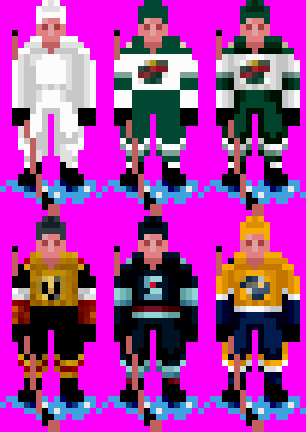
  9. OK, I'm going to try to actively work on this again after a bit if a hiatus. Since the last update I did go through and create more jersey templates and also finalized the designs for the NHL94 default jerseys (based them off the NHL 95 PC jerseys but some of them needed to be tweaked to be more accurate). They still need to be converted to 3bit color & auto shaded (which I believe I've already written a script to do-- its been a while I've looked at all of this and need to remember what scripts do what 😅) BTW I realize the palette zones are complete broken on the cross checking sprite on the arms and torso-- thats how they are in NHL 95. Whoever worked on them didn't know what they were doing and/or didn't verify they drew those sprites correctly. If this project is successful, I definitely will come back around and fix those sprites. Next steps: create a script that can then render the jerseys out to template sprite sets + per team palettes Import templates & palettes into ROM Update animation frame rendering logic to select correct Jersey Template if above works, continue with work for crest & numbers: create a script that can render crest definition to crest + crest variation tiles & numbers out to number + number variation tiles Figuring out the most efficient way to place the dummy Crest & Number tiles on the animation frames reimport templates into rom update animation frame rendering logic to select correct crest variation & number variation
  10. Taking a look at the Madden 93 ROM there's a chance that maybe it uses a similar format...I see uncompressed tiles for both player sprites and general game images. I just don't have the time/bandwidth right now to investigate this further. If you are handy with coding, you can study the file formats I've described in my repository and see if Madden matches it. The player graphics start at 0x75936. The initial set of player sprites in the rom are 4 tiles wide by 4 tiles tall: Then at 0x93616 it switches over to sprites of size 4 tiles wide x 3 tiles tall It continues from there. I think this might be a simplified format compared to NHL where it takes a lot more work to assemble the sprites as the tiles for each sprite frame can be spread across the animation section of the ROM.
  11. Not directly. I would have to Check to see if Madden uses the .ANIM format, but I want to say I have been checking various things from sound formats to graphics formats and haven’t found any matches across various EA Genesis games. Don’t remember if I checked Madden 93.
  12. whiznant started following bcrt2000
  13. I am both happy for you for whatever happened in your life but also incredibly saddened. It was going to take 6-12 months I think for my bigger mod projects to start bearing some fruit, but I was eager to work with you once I had something. Either way, thank you for all you've done for the community, and hope to have you back one day on the creation side.
  14. Shading support has been added to the script: I think I probably should define more jerseys as the next step, and then I can properly create/test the template rendering script.
  15. I'm back! Took a month break for summer from this stuff. I quickly whipped up a script that takes the jersey definitions above and puts it into the NHL95 palette format. As you can see, its flat shaded for now. In my next update the plan would be to add shading support. Next steps: add shading support to script that generates NHL95 palette from template definition create a script that can then render the amount of needed sprite sets to support all of the defined jerseys. create a script that can render crest definition to crest + crest variation tiles Figuring out the most efficient way to place the dummy Crest & Number tiles on the animation frames Updating player sprite tiles Import Chicago/Dallas jersey templates & palettes into ROM Update animation frame rendering logic to select correct Jersey Template, Crest & Number tiles. Yes, already have taken a look. Although I think for V1 of this it would be just taking the NHL94 jerseys and porting them over to the stock NHL94 ROM.
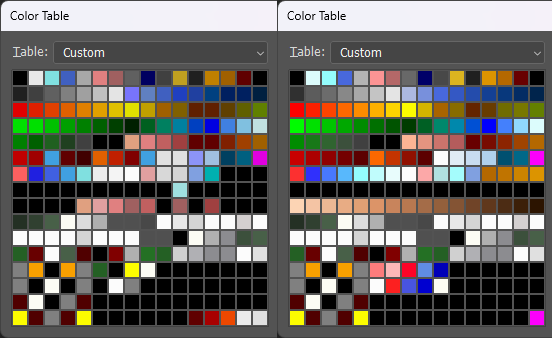
  16. Alright, so I half lied when I said I wouldn't make a jersey editor-- I'm not going to make the UI, but I am going to build some scripts around automating palette conversion processes as its going to make it so much easier to create & edit jerseys for me. First, I created a standard jersey template that will work for MOST jerseys. I used this tool called JED (v3.01) which is a jersey editor for NHL95PC: One thing you may notice is the jersey is flat shaded-- it's intentional. I plan to automate the shading bit to make it even easier/quicker to put together jerseys. I've spent time analyzing the palette: and have mapped out what each palette entry means: Colors 0-127: Rink Palette (aka Game Palette) Static rink/ice colors from rinkpal.act Colors 128-143: Skin Tones (16 colors) Dedicated flesh/skin tone colors Colors 144-191: Jersey Components (48 colors) Mapped as follows: 144-146: forearm (dark, medium, light) 147-149: armStripe3 (light, medium, dark) 150-152: armStripe2 (dark, medium, light) 153-155: armStripe1 (light, medium, dark) 156-158: armUpper (light, medium, dark) 159-163: yolk components (yolkCorner, shoulderPatch, yolk3, yolk1, yolk2) 164-166: jersey (goalieMask, light, medium, dark) 167-169: waist1 (odd, even, hidden) 170-172: waist2 (light, medium, dark) 173-175: waist3 (light, medium, dark) 176-179: pants (dark, pantsStripe2, pantsStripe1, medium) 180-182: socks (light, medium, dark) 183-185: socksStripe1 (light, medium, dark) 186-188: socksStripe2 (light, medium, dark) 189-191: helmet (medium, dark, unused) Colors 192-255: Crest and Logo Data (64 colors) Organized in 4 rows of 16 colors each: Each 16-color row contains: 5 colors: Crest row pixels (5×4 crest grid) 6 colors: Ice logo colors 5 colors: Unused/padding Row breakdown: 192-207: Crest row 1 + ice logo + padding 208-223: Crest row 2 + ice logo + padding 224-239: Crest row 3 + ice logo + padding 240-255: Crest row 4 + ice logo + padding So as you may have noticed, this template has 23 color zones, and if you include shading it can be up to 48 colors. Now the idea is: define jerseys using this template use automation to fit each jersey into 16 colors (some teams might just fit as is with using full advantage of shading, other teams, the automated script would reduce shading in some areas to fit it into 16 colors) and also create the minimal amount of sprite sets required to support all of the jerseys. So I've created the following data structure to be able to define color jerseys: const jerseyDef = { "global": { "palette": { "brown": "144 108 0", "black": "0 0 0", "darkBrown": "108 72 36", "flesh": "220 148 104", "flesh2": "200 132 92", "flesh3": "164 108 72", "flesh3bit": "216 144 108", "flesh3bit2": "180 108 72", "white": "252 252 252" }, "mapping": { "stick": "brown", "equipment": "black", "eyes": "darkBrown", "skin1": "flesh3bit", "skin2": "flesh3bit2", "skin3": "flesh3bit2", "skateBlade": "white" } }, "0": { "name": "Chicago Blackhawks", "palette": { "red": "144 0 0", "yellow": "180 180 0" // "chiWhite": "216 216 216" }, "home": { "template": "classic", "helmet": "black", // "yolk1": "0 0 0", // "yolk2": "0 0 0", // "yolk3": "0 0 0", // "yolkCorner": "0 0 0", "shoulderPatch": "yellow", "jersey": "red", "waist1": "white", "waist2": "black", "waist3": "white", "pants": "black", "pantsStripe1": "white", "pantsStripe2": "red", // "socks": "0 0 0", "socksStripe1": "white", "socksStripe2": "black", // "armUpper": "0 0 0", "armStripe1": "white", "armStripe2": "black", "armStripe3": "white", // "forearm": "0 0 0", "goalieMask": "white", }, crest: [ "red", "black", "black", "black", "red", "red", "brown", "black", "black", "brightRed", "brown", "brown", "brown", "brightRed", "yellow", "red", "brown", "black", "brown", "red", ], } } Next steps: create a script that will convert this jersey definition into the NHL 95 jersey format, including expanding the flat shaded color zones to be properly shaded to have multiple color tones, whilist also staying within 3-bit and 16 color restrictions. create a script that can then render the amount of needed sprite sets to support all of the defined jerseys. create a script that can render crest definition to crest + crest variation tiles Figuring out the most efficient way to place the dummy Crest & Number tiles on the animation frames Updating player sprite tiles Import Chicago/Dallas jersey templates & palettes into ROM Update animation frame rendering logic to select correct Jersey Template, Crest & Number tiles.

Account

Navigation

Search

Search

Configure browser push notifications

Chrome (Android)
  1. Tap the lock icon next to the address bar.
  2. Tap Permissions → Notifications.
  3. Adjust your preference.
Chrome (Desktop)
  1. Click the padlock icon in the address bar.
  2. Select Site settings.
  3. Find Notifications and adjust your preference.