von Ozbourne
-
Posts
439 -
Joined
-
Last visited
-
Days Won
113
Content Type
Profiles
Forums
Events
Everything posted by von Ozbourne
-
Widescreen Patch 1.2 posted on Romhacking.net fixed some of the crowd animation and player display issues. Updated IIHF 99's widescreen mode. IIHF 99 - [Widescreen Edition 1.2].bin Updated in the original post as well.
-
Thanks for pointing out the 1.2 patch. Glad to say that fixed some of the widescreen display issues. Updated the original post.
-
Nah. Unfortunately I've always noticed that, well, all of the games from '92-'98 really, will seed the first round to whatever parameters existed at the time, but then just follow the old format of escaping the Charles Adams, Lester Patrick, Conne Smythe and Chuck Norris divisions to get to the conference finals. I'm guessing that the programmers didn't even bother with any reseeding code.
-
NHL 2023 [94] by Jkline3 and von Ozbourne
von Ozbourne replied to von Ozbourne's topic in Genesis Roms
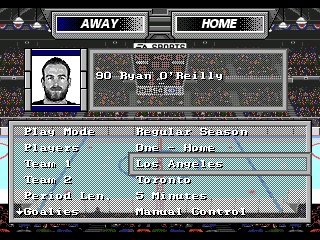
Alright. Time to get this one out the door. The Trade Deadline has come and past, so it's about time this update was posted. New to this version: Updated rosters obviously. Revamped Title screen for more colours and nicer artwork. All players can play at any position, so go ahead and put five forwards on the PP or five D-men on the checking line. Goalie Y-button hack has finally been applied. New Menu BG [shout out to the amazing @Drezz] Including some branding. Probably forgetting a couple things, or forgot to fix a couple things... Those can wait for the playoffs. Let me know if something is egregiously wrong. [or if you have any suggestions for future updates too] Updated the original post as well. NHL2023 RR94 Trade Deadline Ed.bin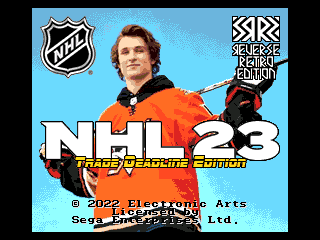
-
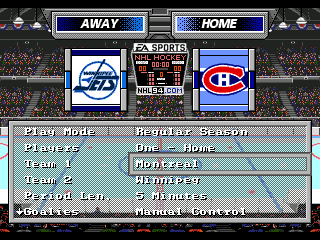
Huh, I had noticed the box thing before. I'd fixed it on a couple games in the past by adding that one extra pixel to the top of the boards to fill the gap. Forget if I remembered to do it in my last mods... The glass edge completely slipped by unnoticed though ...until now. *grumble*
-
Genesis NHL 94/95/96/97/98 wide mode (256x224 to 320x224)
von Ozbourne replied to elfor's topic in Genesis Roms
Well that's too bad. Admittedly I only played a few games with this mod applied and wasn't really paying attention to that. Although I guess I'm not surprised. I find that modding these games is a lot like playing with LEGO. You can create anything that your imagination can desire, ...just as long as it works within the limitations of the medium and you realize that you're probably going to end up breaking something else apart to build it. -
Genesis NHL 94/95/96/97/98 wide mode (256x224 to 320x224)
von Ozbourne replied to elfor's topic in Genesis Roms
The first step would be to get Lunar IPS. It's pretty straight forward from there. You just open the program and it asks you to select the patch, then the ROM you want to patch and then it applies it and you're done. You may want to keep an Standard Resolution backup just in case. Or, thanks for the interest in the '96 Playoff Edition. If it's easier, I uploaded a widescreen version of that mod to the original post. -
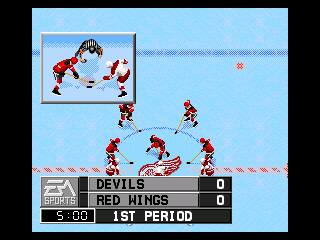
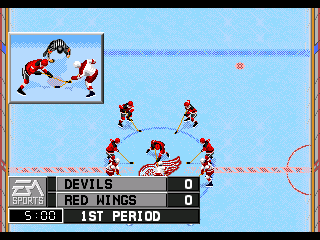
Reminded of this mod so added a Widescreen Edition to the original post.
-
NHL 94: Hockey Night in Canada 1990-1991 Season
von Ozbourne replied to Drezz's topic in Genesis Roms
Yeah, to be honest I figured that was the case rather than it being an accident. I've seen the quality of your work. I think for me, the ideal "webbing" would need to be half a pixel, but since that is impossible, it's kind of hard to tell which way to round off. The key though is that in full motion, it really gets the point across. -
NHL 94: Hockey Night in Canada 1990-1991 Season
von Ozbourne replied to Drezz's topic in Genesis Roms
Oh, did Belfour recently face an Al MacInnis blast? It looks like he has a hole in his glove. Liking the masks. Looks like the old Cooper birdcage. -
NHL 94: Hockey Night in Canada 1990-1991 Season
von Ozbourne replied to Drezz's topic in Genesis Roms
Ah, I miss the days when a player's cap space only meant this: And the perspective tapering on the sideways logos is a really nice touch. Looking forward to correcting the travesty of the Jets loss to the Oilers after taking a 3-1 lead. No popcorn allowed!
-
There are 30 and 32-Team versions of NHLPA'93 posted here. I've only used them for IIHF ROMs but they do have team logos put in there. I think the original mod was based on the NHL 2018-19 season. Don't recall seeing a more recent one though. Just checked. The 30-Team ROM has team logos in the banners and center ice locations. Unfortunately the 32-Team version actually only has one common center ice logo for all teams.
-
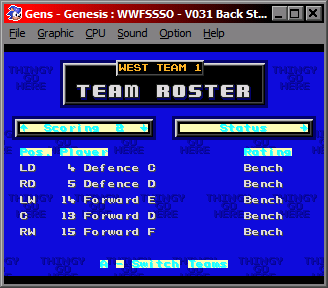
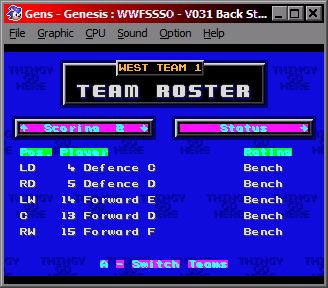
So I guess I have two questions. 1. I found an instance of a 054E24 at offset 870F. Weird thing was that when I changed that one to my new offset, it changed the Line Editor screen background, but when I changed it back to the original 054E24, it messed up the tiling pattern on same background. 2. I glitched all of the menu overlays on my first attempt, so I'll need to re-examine what I did there and try again, but in testing the game after Step 2, I noticed that all of the backgrounds looked just fine, but a lot of the text would look like this now. Edit: Well that was quick. On a hunch I checked the third and fourth palette that were included in the redirection instructions. Noted that the colours matched what I had in there as place holders and changed the light colours and voilà. Green is the 3rd palette, Magenta is 4th. I guess I just need to change them to match what they used to look like when they referenced the original palette. So I guess my follow up question is: I don't actually understand what Steps 3 to 5 do.
-
Ah, I knew it was only a matter of time before this genius was going to force me to revisit a couple ROMs. Clearly you have no respect for my time.
-
HOW TO: Give every player back their photos in 32-team ROM
von Ozbourne replied to von Ozbourne's topic in How-To & Reference
I don't know about a contact sheet, I just know that those ten bytes between pictures is a pain for importing. Not sure if there is something better, but the method I've settled on involves opening two files in TM and set to Go To Offset on relative mode of Hex 36A. Then I use one as my scrap file [usually just a previous save] and set the window size to 6x128 tiles. Since my photoshop file of all of the player photos is arranged as a giant cube so I can edit all of them at the same time, I just import it, usually one team at a time to make sure they look good. Then it's really just a matter of resizing it to 6x6 and mashing page Down, ctrl c, click [next window], F5, ctrl v, click [first window] a bunch of times until you get to the end and it's time to import the next team. I suppose a keyboard macro might be a good idea here, but the paranoid control freak in me likes to observe the entire process in case I need to make changes. Ideally it might also be possible to set up a photoshop action that could arrange the photos and compensate for the pointer info, but so far that feels like a self check-out at the grocery store. Automation that feels like more work than just doing it the old way. -
Editing music/sounds in NHL '94- a start
von Ozbourne replied to Asher413's topic in General Discussion
Yay, tedium.... -
Editing music/sounds in NHL '94- a start
von Ozbourne replied to Asher413's topic in General Discussion
Okay, have to say it, this is fantastic information that I will reference later when I have had more time to learn how to do this. But now I do have a question. If I cannot find a midi of a song I like, but I do have an NSF, SPC or VGZ version, do I need to convert it first? -
HOW TO: Give every player back their photos in 32-team ROM
von Ozbourne replied to von Ozbourne's topic in How-To & Reference
Huh, I always wondered about that.... Uh, I mean, what are you talking about? It looks perfectly fine to me. -
Tell you what, we can make it a community effort. I played the first two months as Boston, [they were first in line] got them to 23-0-1 with an accidental scoreless tie due to picking a team with few shooters, but that's okay because I liked ties. A third of the way there. Now if somebody else will tag in for a round, we can get this done. NHL 95.srm
-
Could just do what I do when I'm testing playoffs. Play 2 VS mode, your "opponent" pulls the goalie, oh and 30 second periods so you don't take all day. [although testing 16 games takes long enough, can't imagine 70]
-
Curious what led to this. Seems that it only affects the section of the lines that overlap with the glass, but that section of ice would have three layers with the ice, player and glass. So does this mean there are four now? Did you only redraw the ice lines? Or was there more to it, with reordering tiles and such.
-
The sacrilege! Although seriously, given the limited number of pixels you have to work with I'd say he looks pretty good.
-
Of course google is bloody useless these days, but I was trying to find an image example of the old DOS "This is freeware" screens. In lieu of that, I am wondering if some website logo and text disclaimer might be a nice stand in. I'm kind of rolling around a rough idea but the question is how to make it fit in.
-
I like the blend of old, new and subtlety. My only critique would be that you could tone down the anti-aliasing on the EA. It looks a bit blurry to me.
-
NCAA Hockey: Road to Tampa Bay (NHL 94) - 2023 NCAA ROMs - Final Update
von Ozbourne replied to Sean's topic in Genesis Roms
Since you're an expert, I've always wondered. If I am forced to shovel the sidewalk in front of my house, and it's public property, am I not doing work for the city? And if i am injured working for the city, am I not then entitled to workers compensation? Although seriously, I already know what I would like in there. Guess I just have to take your word for it and get to it. Soon you you may find yourself at that stage where you have changed everything, except the style of the player sprites [because seriously that is so much work, who wants to do that....] and those two things that there is no way to change. And it will annoy the hell out of you.