
clockwise
-
Posts
1,994 -
Joined
-
Days Won
154
Content Type
Profiles
Forums
Events
Posts posted by clockwise
-
-
Also need to upgrade your potato.
-
@CaseBC we seriously need you guys to sign up for 2on2, RetroArch matches.
https://forum.nhl94.com/index.php?/topic/16398-snes-2v2-the-beginning/
-
 2
2
-
-
56 minutes ago, kidswasted said:
I think they have a beefed up snes ever drive that allows fx games to be played. Didn’t even think about Mario Kart. Probably my favorite MK of all time.
Yeah they do. It's like, $200 bucks, though.

-
 1
1
-
-
2 hours ago, chaos said:
one thing about everdrives, is they don’t have the special chips for some games (like super fx for star fox). So there are some games that are incompatible with it.
Yeah. Was pretty disappointed to learn that I couldn't play Super Mario Kart. Not that big of a deal since there aren't that many games that use the DSP and Super FX chips.
-
1
-
-
My thoughts on the Model 3 from last year, but the post is mostly about the Retro-Bit, USB repros. The Model-3 was made by Tectoy, a company from Brazil. They produced SEGA consoles in Brazil in the 90's and into the early 2000s'.
On 6/13/2019 at 12:02 AM, clockwise said:Update:
The Saturn pads are the best pre-analog stick pads ever created, and I don't judge cheap knock-offs of this legend kindly. I've had a few over the years as well (humble brag).
They Saturn pad is really good and hard to distinguish from the original. The d-pad isn't quite the same feel, but the Saturn d-pads are like a good pair of leather shoes: they wear better after being broken in. So, I'd have to play more to give a final verdict. Nice thing is you can swap parts with an original Saturn pad.
This Gen pad is far superior to the model-3 Gen pad and on par with other 6-button versions; Sega CD for example.
EDIT:
Just want to clarify if there is a bit of confusion, I was referring to the Model-3 SEGA console, not a controller of some sort. It's the 6-button pad that came with this:

I had this system. It feels one of those balsa wood paper air planes we used to get at the hobby shop as a kid. Also, the cable is really short. Which was intended, because if it was any longer you'd try to hang yourself with it once you realize how bad the build quality actually is.
Some are a fan of the batwing Genesis pad, and I do respect it for just being iconic built like a tank, but I don't like it. Thankfully the repros from retro-bit are more than serviceable.
Good buy.
-
 1
1
-
-
How many tabs of acid do I have to drop to understand these? Or maybe it's like one of those Magic Eye posters that you have to stare at until you're crosseyed.
-
1
-
-
Though, it has been fix by smoz, I also noticed that the ROM doesn't crash in SNES like when you edit lines in Gens.
-
Don't know how I forgot a major, major one:
- In Gens you press pass, or 'B' to get up. in SNES you press 'hook' to get up. Or, move-thumb-over-to-that side-that-the-d-pad-is-on, button.
-
Couple of differences I've noticed in 2on2 between SNES and Gens:
- Framerate seems higher in SNES 2on2, as compared to SNES 5on5. I've noticed this on an actual SNES with my Super Everdrive as well.
- You can speed burst out of control quickly by just spamming it. In Gens, you have to get checked really hard into the boards to lose control of your skater so that they can speed burst super fast.
- Floater goals are very rare to come by.
- Flying burrito saves don't work well at all, unless they're done across the goal line.
- Penalty shots happen even with penalties off. Not sure how I feel about it, but I wish we could toggle it on / off.
Having a lot of fun with SNES 2on2 so far.
-
1
-
@swos used to the the updates posted on: update.nhl94.com; ROMs are still there -- before I started doing mine in 2009. Not sure how to access @macks' old ROM files.
I don't think they're here, on the forums, but I did the trapezoid and stick-tape patch for his ROM, which was right after the lockout. IIRC, he had Selanne for the primary splash screen.
-
Trying to figure out if I should be realistic in the ratings, or what?
Obviously the Democrats and Republicans are gonna be rated 0 for everything. Unless someone want's to donate to Jesus', abolish-95 lobbying group.
-
1
-
-
3 hours ago, LaTormenta said:
@clockwise - Aye, I know what you mean but I just want to have as good a stab at it as I can whilst I have the time. Once I find something that works, I will be able to plough through the rest.
Plus, as stupid as this sounds, I actually find it quite relaxing!
Believe me, I get it.
I did the roster updates here for years, and humbly say that my logos were the best ever. I'd agonize over a pixel here or there like a repressed perfectionist. This is coming from a guy that bought 20+ media guides from the 90-91 NHL season just so he could scan them to make player cards.Just try to keep in mind people play these edits to have fun and we all appreciate the hard work that goes into your edits.
-
2
-
-
Guys playing are more focused on scoring goals and having fun than they are focused on the quality of a logo.
Looks good enough.
-
I would just go with this:

Or this:

Obviously they need to be cleaned up and have pieces removed, but you need to compromise on center ice logs.
Also, before importing, make sure that you use the palette vales as they appear in TM, not as they appear in NOSE or the image editing software you use.
-
1 hour ago, BigValboski said:
My ultimate claim to fame was having lunch with Doc Emrick. He had stories for days. And yes, he converses the same was he commentates.
Did you guys eat close to home or was it a BIG DRIVE?!
-
 1
1
-
-
1 hour ago, smozoma said:
NES Ice Hockey always made me scratch my head...
Canada, USA, USSR, Sweden, (T?)Czechoslovakia, and.. Poland?
FYI, Japan actually replaces Sweden in the Famicom / Japanese version.
That's why I thought there might be a Japanese team in the Japanese version of EA Hockey.
-
1
-
-
11 hours ago, jmomonyc said:
put me in any league, i am game

-
2
-
-
6 hours ago, Bob Kudelski said:
Sign me up for the eh league please

Once in a lifetime!
-
1
-
-
That's the most, "y tho," controller I've seen yet.
-
It does explain the massive, Hungarian, Terry Yake fanbase.
-
39 minutes ago, MikeGartner22 said:
Here’s everyone with my chicken scratch.
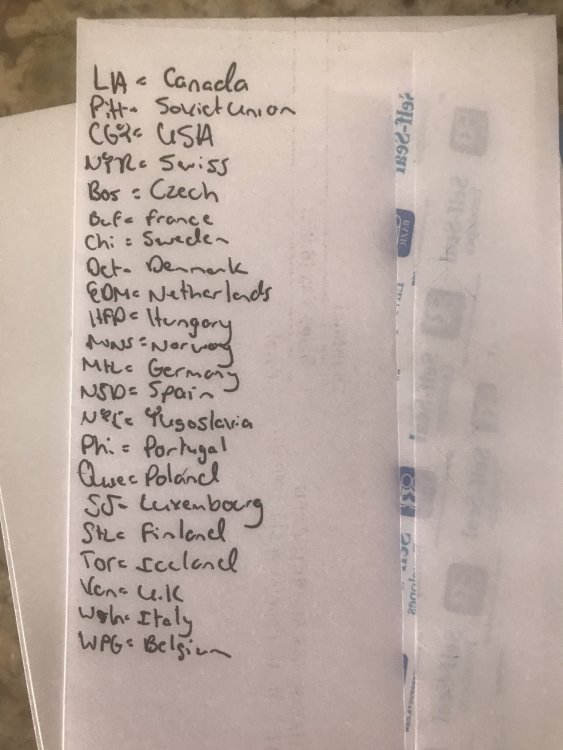
You can open the rom in the NHL Old School Editor to edit the ratings and see the teams, too:
-
22 hours ago, kgman said:
No I should be in hall of fame! Nhl is finished ....nhl94 will live on forever ....I think my statue should replace all those racist hockey players of the past

'Cuse me I'mma let you finish but Roenick is the greatest weight bugger of all-time.
-
Table from hockey-reference:

-
2
-
-
4 hours ago, segathon said:
No prob, I'm sure @clockwise paid you a large sum of money to keep me out of the tourney.....
I'll just watch from the bench with my gameboy drinking hot chocolate
If you really want to know the truth: he refused to accept my bribe, even though I told him, "I'll leave it on the ground if you don't take it, now, take it!" -- like an old Italian mother --- "It's your money, here, take it."
That's just the kind of guy @seamor is.
-
1
-
1
-

Weekly Leagues Live Stream (Thursdays on twitch.tv/kingofnhl94)
in Global Announcements
Posted
This is awesome!
If I can make a suggestion: maybe you could do a NHL'94 rewind, or NHL'94 classic matchups if there isn't anyone available? Like, replay a matchup from a GDL championship or something like that.
Keep up the great work Smoz!