

PixelDragon
-
Posts
629 -
Joined
-
Last visited
-
Days Won
2
Recent Profile Visitors
11,647 profile views










PixelDragon's Achievements




-

Making a homebrew (Genesis?) hockey game...
PixelDragon replied to hnfoo's topic in General Questions & Discussion
I am -
I personally use a Xbox360 pad, but you can use what you want I presume.
-
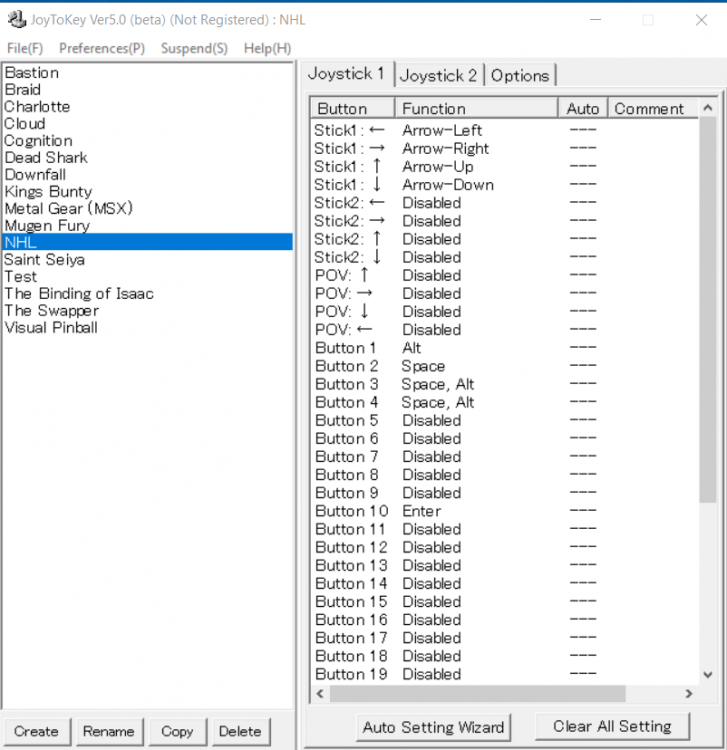
Use JoyToKey to map your keyboard with your gamepad. See the picture for an example.
-
Ok, si tu as des questions sur les outils ou autre, n'hésite pas.
-
Hi, Thanks for your post, I don't have a lot of free time lately but I will try to play some exis.
-
Salut, Je peux te guider si tu veux, je pourrais aussi moder la rom mais je n’ai pas vraiment le temps en ce moment, si c'est urgent. Mais je connais bien les outils pour les compositions d'équipes, pour le visuel je ne m'y connais pas trop, mais il y a des gens ici qui sont très fort avec les logos et les uniformes. Sinon la rom, c'est pour usage personnel ou pour faire une ligue en ligne ?
-
NHL 94 Europe League / Anyone up to ? SNES-GENS
PixelDragon replied to KaBa78's topic in League Ideas / Other Discussion
I'm in for gens. -
Now go Play NHL Two K! (NHL2K11/2KHS)
PixelDragon replied to nikethebike's topic in Post '98 Titles & Other Hockey Titles
What's the point of all of this if we can't even test the game... Why is it so hard to make a new link with the 2KHS 0.5.1 version for PC ? -
Is your Saturn USB controller recognized automatically by retroarch ?
-
Now go Play NHL Two K! (NHL2K11/2KHS)
PixelDragon replied to nikethebike's topic in Post '98 Titles & Other Hockey Titles
This is cool, but the link for the game is dead... -
Great Roms !
-
Yes, post it, we are always interested in new roms.
-
Playoffs - 2 Teammates issue
PixelDragon replied to mitch13's topic in General Questions & Discussion
Are you playing the 2-teammates mode online ? -
It depend what kind of hack you are looking for. Sports game and Online play ?
-
Just discovered the site RetroAchievements . Did someone have a account ? You can find me under Pearate.

